MiniMax H3 Review: Real Video Tests, Audio, Cost & Verdict

Reviewed by
Lioraelle
This MiniMax H3 Review answers the questions creators ask before spending credits: how good the video quality is, which workflows are useful, what native audio and multimodal references add, where results fail, and whether the price makes sense. Real comparison clips and measured file data support the verdict without turning one competitor matchup into the entire story.
TL;DR: Is MiniMax H3 worth using?
MiniMax H3 is worth testing for short ads, product videos, title sequences, social clips, and previsualization when 2K output, synchronized audio, and mixed references matter. Its strongest advantage is workflow control, not automatic perfection. Complex physics, facial consistency, readable text, and multi-shot continuity still require careful review, retries, and sometimes external editing.
To test it with your own brief, open the MiniMax H3 AI video generator and start with one clearly defined shot.
Lioraelle's editorial rating
A subjective editorial score—not a user average or reproducible benchmark—balancing reference control, audio capability, observed clip quality, workflow limits, and value.
3.5 / 5
| Category | Finding |
|---|---|
| Editorial rating | 3.5 / 5 |
| Best at | Reference-rich short videos, product shots, title concepts, and previsualization |
| Standout feature | Text, image, video, and audio guidance in one workflow |
| Main limitation | Fine detail, physical motion, and continuity still need close review |
| Maximum output | Up to 15 seconds at 2K through the hosted Standard workflow |
| Best for | Marketers, motion designers, social creators, ecommerce teams, and studios |
What is MiniMax H3?
MiniMax H3 is a multimodal AI video generator for creating short clips from text, frames, images, video, and audio references. It can produce synchronized picture and sound in one workflow, with hosted output up to 2K and controls designed for text-to-video, image-to-video, and reference-driven generation.
What “omni-modal” means becomes clearer in a practical workflow. Instead of asking text alone to describe a person, a location, a camera move, and a soundtrack, you can provide those materials and explain how each one should guide the output. This can shorten the path from a creative brief to a shot ready for review, but it also introduces more variables. Every reference adds another relationship that may be followed, partially followed, or misunderstood.
MiniMax H3 works best as a production tool guided by clear instructions, rather than a way to generate finished films at random. Use it for a clearly defined task: a product reveal, a character beat, an animated poster, an effects concept, or a short sequence with a defined purpose. Judge the result against the brief, not only against how impressive the first frame looks.
Choose MiniMax H3 for a complete short shot with references and sound. Do not mistake that breadth for guaranteed continuity or final-frame precision.
What works well
- Text, image, video, and audio can direct one request
- Native 32 kHz stereo sound arrives with the picture
- The hosted workflow reaches up to 2K at 24 fps
- Open checkpoints support frame and omni-reference workflows
- Several hosted variants support different production stages
What needs close review
- The official duration range is four to fifteen seconds
- Complex physics and multi-shot continuity can drift
- Faces, textures, text, logos, and compositing can fail
- The open base release does not include every hosted component
- The community license requires a project-specific check
How we evaluated MiniMax H3
This review separates published specifications, visible output quality, workflow usefulness, and service-specific pricing. Each section focuses on a practical buying or production question instead of repeating launch claims.
Official specifications first
Duration, resolution, frame rate, audio format, supported dialogue languages, reference limits, and model architecture come from the MiniMax release and public repository. The official repository states that MiniMax H3 accepts text, images, video, and audio in a unified context. It lists 4-15 second output, 24 fps, default 768-pixel short-side output, 2K through MiniMax H3-Regenerate-2K, and 32 kHz stereo audio. Our hosted Standard interface currently exposes 5-15 second choices, so this review distinguishes the broader model specification from the controls available on this site.
Paired outputs are reviewed directly
The paired videos expose action physics, multi-shot storytelling, and visual stability instead of showing only polished launch footage. The analysis focuses on details that can be checked in the clips themselves, including contact, weight, identity, continuity, texture, and compositing. These are sourced clip audits, not claims that every generation will produce the same result.
No invented prompt, cost, or benchmark
The four visual pairs were preserved from public comparison material, but the source did not publish the exact prompts, seeds, reference packs, test dates, endpoints, generation counts, or billing records. Missing provenance is shown inside every audit instead of being reconstructed. File-level duration, dimensions, frame rate, and audio properties were measured from the delivered clips. H3 credit figures are reproducible current-site equivalents, not claims about a historical charge.
Hosted service and open weights stay separate
MiniMax H3 is both a hosted generation system and a downloadable open-weight release, but they are not identical products. The full 2K workflow includes hosted context processing and regeneration components that are not all part of the initial public-weight package. The open MiniMax H3-Base checkpoints target 768p generation and require substantial local infrastructure. Pricing shown here belongs to MiniMaxm at minimaxm.com, while license comments refer to the MiniMax H3 Community License. Keeping these distinctions clear avoids a common review mistake: taking the best specification from one workflow and combining it with the convenience or usage rights of another.
MiniMax H3 video quality tests: motion, physics, continuity, and artifacts
These side-by-side clips turn broad quality claims into details you can inspect: body mechanics, object weight, identity consistency, editing continuity, texture, and compositing. Seedance footage provides a useful visual reference, while MiniMax H3 remains the subject of the review. The final item adds a separately sourced same-input cost and resolution check.
File properties were measured from the locally retained media; credit equivalents use this site’s current published rate.
1. Action Performance Clip Audit
Winner: Seedance 2.5A boxer faces a mechanical opponent in the same dramatic arena setup. The comparison examines whether movement, contact, reactions, lighting, and body proportions remain believable throughout the exchange.
Original prompt record
Original generation prompt: not published with the source clip.

No prompt was reverse-engineered or rewritten and presented as the original. A controlled rerun requires the creator's exact prompt, input assets, seed, model endpoint, and generation log.| MiniMax H3 parameters | Seedance 2.5 parameters |
|---|---|
| Delivered file: 1920 x 1080, H.264, 24 fps | Delivered file: 1936 x 1080, H.264, 60 fps |
| Observed runtime: 15.208 seconds | Observed runtime: 15.100 seconds |
| Audio stream: AAC, stereo, 32 kHz | Audio stream: AAC, stereo, 44.1 kHz |
| Source generation date and hosted endpoint: not retained with the clip | Source generation date and endpoint: not published |
| Generation mode, seed, reference inputs: not retained with the clip | Generation mode, seed, reference inputs: not published |
| Generation count and failed-attempt ledger: not retained with the clip | Generation count and failed-attempt ledger: not published |
| Generation hardware: provider-managed and not disclosed | Generation hardware: provider-managed and not disclosed |
| Actual credits charged: not retained with the clip | Actual credits charged: not published |
| Current-site equivalent for a 15 s rerun: 30 credits at 768P or 60 credits at 2K, before reference extras | — |
00:03
H3 brings the robot arm across the boxer without a clean impact beat; Seedance shows a clearer hit and recoil.
00:06
Both switch overhead. Seedance preserves the fighters’ separation and stance more clearly.
00:09
H3 loses weight and contact as the bodies collapse; Seedance keeps the exchange readable.
00:12
Seedance exits the action with more stable body proportions and ring geography.
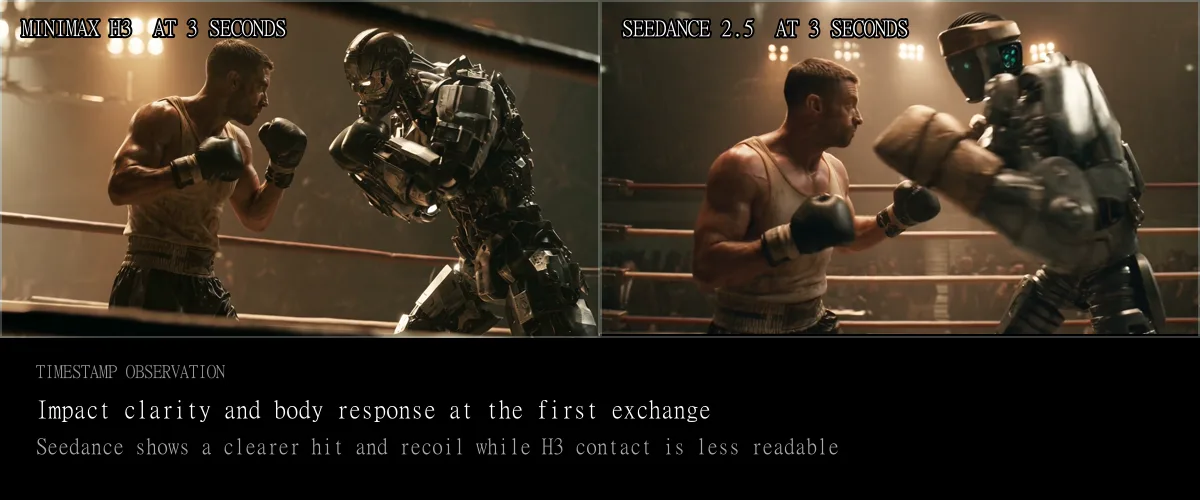
This opening comparison puts the review criteria into context. Both clips establish a cinematic boxing scene, but atmosphere alone is not enough to judge the result. Watch the human stance, the robot’s weight, the distance between the bodies, the timing of a strike, and whether each reaction follows naturally from the preceding action. In this pair, Seedance 2.5 handles demanding motion more convincingly. MiniMax H3 still produces a clear concept with strong contrast, distinctive character design, and immediate visual impact. For a pitch or storyboard, that may be enough. For a final action insert, physical contact and body mechanics need frame-by-frame inspection.
2. Large-Scale Action and Physics Clip Audit
Winner: Seedance 2.5A pickup truck drives through an explosive disaster scene. The clip brings vehicle movement, debris, fire, smoke, camera motion, and shifting depth together in one short action sequence.
Original prompt record
Original generation prompt: not published with the source clip.

No prompt was reverse-engineered or rewritten and presented as the original. A controlled rerun requires the creator's exact prompt, input assets, seed, model endpoint, and generation log.| MiniMax H3 parameters | Seedance 2.5 parameters |
|---|---|
| Delivered file: 1920 x 1080, H.264, 24 fps | Delivered file: 1936 x 1080, H.264, 60 fps |
| Observed runtime: 15.208 seconds | Observed runtime: 15.162 seconds |
| Audio stream: AAC, stereo, 32 kHz | Audio stream: AAC, stereo, 44.1 kHz |
| Source generation date and hosted endpoint: not retained with the clip | Source generation date and endpoint: not published |
| Generation mode, seed, reference inputs: not retained with the clip | Generation mode, seed, reference inputs: not published |
| Generation count and failed-attempt ledger: not retained with the clip | Generation count and failed-attempt ledger: not published |
| Generation hardware: provider-managed and not disclosed | Generation hardware: provider-managed and not disclosed |
| Actual credits charged: not retained with the clip | Actual credits charged: not published |
| Current-site equivalent for a 15 s rerun: 30 credits at 768P or 60 credits at 2K, before reference extras | — |
00:03
Both establish the truck and incoming blast; Seedance makes the blast-to-vehicle relationship more immediate.
00:06
H3 delivers a strong fireball, but debris and vehicle response do not fully share the same force.
00:09
Watch wheel contact and the pickup silhouette: H3 looks steadier as a still, while Seedance carries more physical momentum.
00:12
Seedance sustains smoke and forward motion; H3 returns to a more static hero-frame composition.
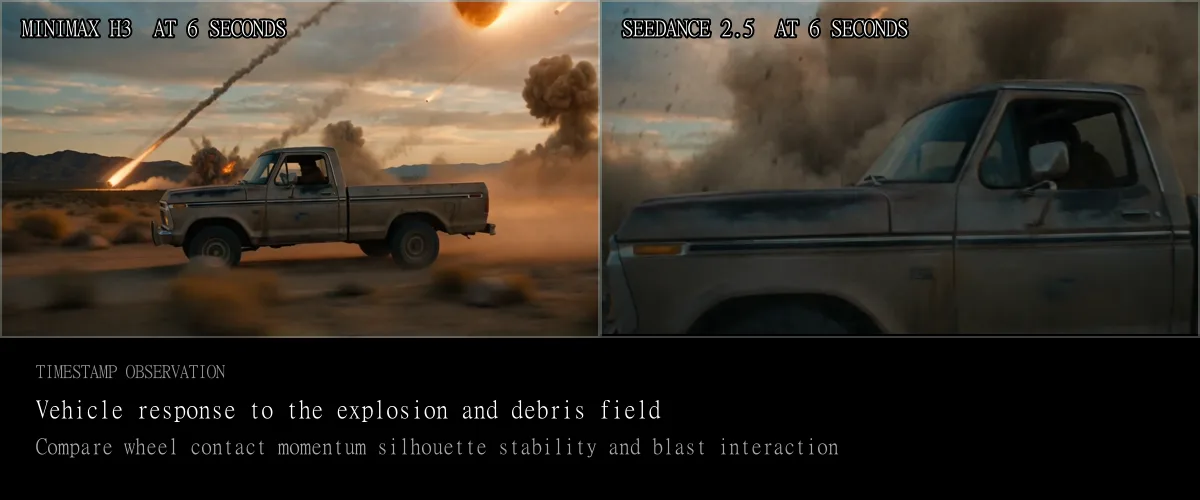
Action scenes expose weaknesses that a quiet portrait can hide. Viewers expect the truck to maintain a convincing sense of weight, speed, shape, and direction as explosions affect the surrounding environment. In the examples shown here, Seedance 2.5 produces stronger physical interaction, while MiniMax H3 is more likely to introduce motion that breaks the illusion. Treat this clip as a stress test rather than a visual showcase. MiniMax H3 can convey scale, urgency, shifting light, and the atmosphere of a cinematic disaster. The harder question is whether every object follows consistent physics from one moment to the next. For advertising, pitch work, or storyboards, the energy may be enough. For a final effects shot, inspect wheel contact, debris paths, reflections, vehicle geometry, and whether camera shake matches the event that appears to cause it.
3. Multi-Shot Storytelling and Continuity Clip Audit
Winner: Seedance 2.5A short sequence changes framing while attempting to maintain consistent characters, setting, emotion, and narrative direction across cuts.
Original prompt record
Original generation prompt: not published with the source clip.

No prompt was reverse-engineered or rewritten and presented as the original. A controlled rerun requires the creator's exact prompt, input assets, seed, model endpoint, and generation log.| MiniMax H3 parameters | Seedance 2.5 parameters |
|---|---|
| Delivered file: 1920 x 1080, H.264, 24 fps | Delivered file: 1920 x 1080, H.264, 60 fps |
| Observed runtime: 15.208 seconds | Observed runtime: 30.162 seconds |
| Audio stream: AAC, stereo, 32 kHz | Audio stream: AAC, stereo, 44.1 kHz |
| Source generation date and hosted endpoint: not retained with the clip | Source generation date and endpoint: not published |
| Generation mode, seed, reference inputs: not retained with the clip | Generation mode, seed, reference inputs: not published |
| Generation count and failed-attempt ledger: not retained with the clip | Generation count and failed-attempt ledger: not published |
| Generation hardware: provider-managed and not disclosed | Generation hardware: provider-managed and not disclosed |
| Actual credits charged: not retained with the clip | Actual credits charged: not published |
| Current-site equivalent for a 15 s rerun: 30 credits at 768P or 60 credits at 2K, before reference extras | — |
00:03
Both cut from the two-shot to the man. Seedance keeps the café layout and wardrobe relationship more stable.
00:06
H3 changes facial structure and background details between angles; Seedance holds the same man and table.
00:09
H3 inserts a hand close-up with weaker spatial continuity; Seedance keeps the performance within one coherent setup.
00:12
The H3 close-up reads as a different performance and face; the Seedance woman remains recognizable.
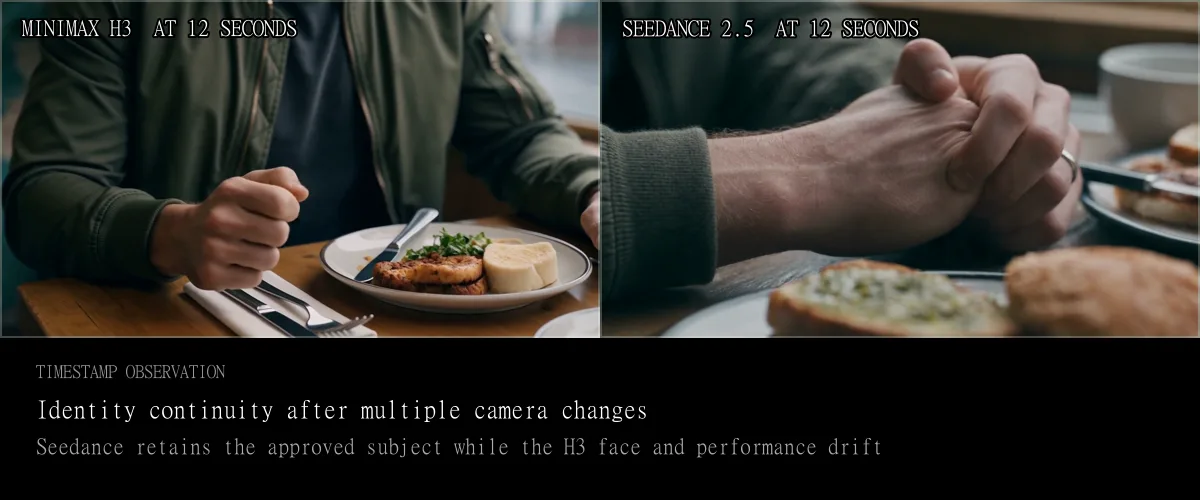
MiniMax presents native multi-shot modeling as a MiniMax H3 capability, an important feature for ideas that need more than one camera angle. A usable sequence must do more than cut between attractive images. The subject should remain recognizable, the space should remain coherent, eyelines should align, and each edit should advance the action. In this comparison, MiniMax H3 creates a multi-shot scene but delivers less expressive performances, less natural edits, and weaker continuity than Seedance. At each cut, wardrobe, facial structure, background layout, screen direction, and emotional intensity can drift. MiniMax H3 can be productive for animatics and early story development, especially when the prompt describes each beat clearly. A finished campaign sequence will still benefit from generating shots separately, selecting the strongest takes, and assembling them in a conventional editor.
4. Visual Artifact and Compositing Clip Audit
Winner: Seedance 2.5A diner scene tests environmental stability, facial detail, window reflections, background lettering, and how naturally the subject fits into the setting.
Original prompt record
Original generation prompt: not published with the source clip.

No prompt was reverse-engineered or rewritten and presented as the original. A controlled rerun requires the creator's exact prompt, input assets, seed, model endpoint, and generation log.| MiniMax H3 parameters | Seedance 2.5 parameters |
|---|---|
| Delivered file: 1920 x 1080, H.264, 24 fps | Delivered file: 1936 x 1080, H.264, 60 fps |
| Observed runtime: 15.208 seconds | Observed runtime: 30.139 seconds |
| Audio stream: AAC, stereo, 32 kHz | Audio stream: AAC, stereo, 44.1 kHz |
| Source generation date and hosted endpoint: not retained with the clip | Source generation date and endpoint: not published |
| Generation mode, seed, reference inputs: not retained with the clip | Generation mode, seed, reference inputs: not published |
| Generation count and failed-attempt ledger: not retained with the clip | Generation count and failed-attempt ledger: not published |
| Generation hardware: provider-managed and not disclosed | Generation hardware: provider-managed and not disclosed |
| Actual credits charged: not retained with the clip | Actual credits charged: not published |
| Current-site equivalent for a 15 s rerun: 30 credits at 768P or 60 credits at 2K, before reference extras | — |
00:03
H3 changes the diner layout and pushes into a different character; Seedance holds the woman, window, and table.
00:06
H3 introduces a new entrance and body pose, increasing identity and compositing risk.
00:09
Background lettering remains unstable in both; Seedance keeps the approved subject and lighting more consistent.
00:12
Seedance preserves the woman’s face and booth geography; H3 ends on a visibly different face and setup.
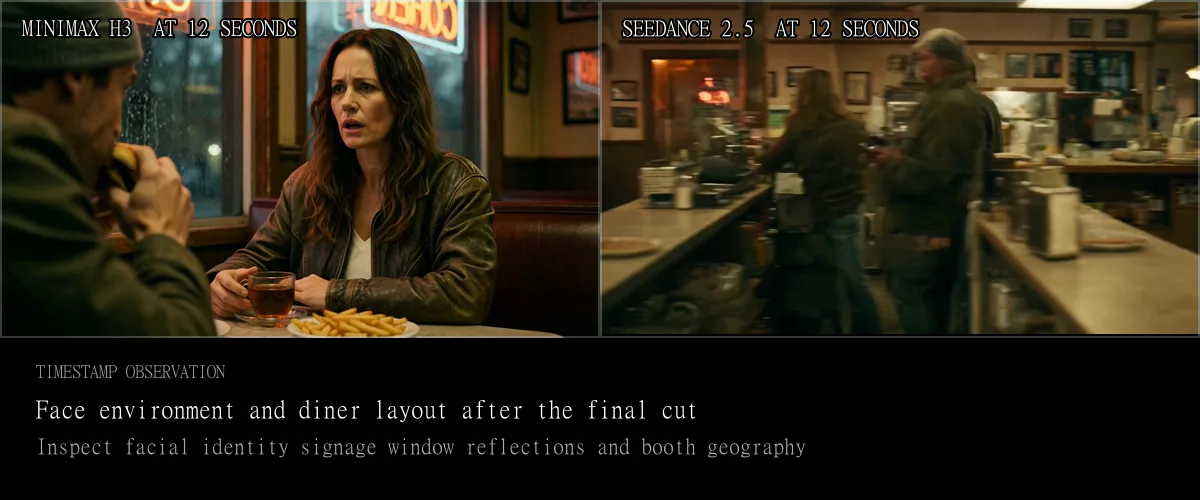
Quiet scenes make small mistakes easier to notice without spectacle to distract the viewer. In this pair, look at facial structure, hair, hands, reflections, table edges, background lettering, and how naturally the person fits into the diner’s lighting. The MiniMax H3 example shows areas where texture, facial detail, compositing, and visual noise deserve closer inspection. The exact severity varies by frame and generation, but the underlying lesson is the same: a polished color palette does not guarantee consistent detail. MiniMax H3 can create a convincing atmosphere and a workable visual direction. A final campaign shot still needs a full-resolution review, especially when recognizable identity, product packaging, signage, or clean compositing is part of the brief.
5. Real cost and delivered-resolution check
Winner: MiniMax H3A retained comparison record ran one reference pack and prompt through MiniMax H3 and the available Seedance 2.0 reference-to-video endpoint. H3 returned twice the reported resolution for less than half the total dollar cost. The endpoint defaults produced unequal runtimes—8 seconds for H3 and 10 seconds for Seedance—so both total and per-second cost are shown. This is useful workflow evidence, not a claim that H3 beats Seedance 2.5 on visual quality.
Prompt record: the retained comparison record states that the same reference pack and prompt were used for both endpoints.

The complete third-party prompt was not republished with the locally retained media.| Field | MiniMax H3 | Seedance control |
|---|---|---|
| Endpoint | MiniMax H3 reference-to-video | Seedance 2.0 reference-to-video |
| Inputs | Same two-image reference pack | Same two-image reference pack |
| Run settings | 2K, 8 s, adaptive ratio; prompt requested 9:16 | 720p, 10 s, endpoint-default aspect ratio |
| Delivered result | 1440p, vertical | 720p, landscape |
| Reported actual cost | $1.12 | $2.42 |
| Reported cost per output second | $0.140 | $0.242 |
| Credits on this site | 32 credits for a comparable 8 s 2K generation before reference extras | Not sold on this site; no comparable credit value |
OUTPUT
The H3 endpoint followed the prompt’s vertical framing and returned 1440p; the Seedance control returned 720p landscape.
COST
The H3 run cost $1.30 less in total (53.7% lower) and 42.1% less per delivered second, despite returning the higher resolution.
Verdict: H3 wins this control on delivered resolution and reported cost. The scope stays narrow: it compares a live Seedance 2.0 endpoint because Seedance 2.5 was unavailable on the tested platform.
What MiniMax H3 does well, and where it falls short
A long feature list does not explain whether a model belongs in a production workflow. Each section below explains how a capability affects production decisions and what still needs human review.
Unified multimodal direction
A defining reason to consider MiniMax H3
MiniMax H3 can interpret text, images, video, and audio within a single context. In its Ref2VA mode, the official repository allows up to nine images, three reference videos, and three reference audio clips, with no more than 12 files in total. Video and audio references must each stay within the published duration limits. In practice, each reference can guide a different aspect of the shot. One image can define a face, another can define clothing, a video can supply a camera move, and an audio clip can set timing or delivery. This is more flexible than forcing every idea into a text-only prompt. It also gives directors and clients familiar materials to discuss. The task shifts from finding the perfect descriptive word to explaining how each reference should shape the intended shot. Clear names, ordered instructions, and a purpose for every file usually make that relationship easier to understand.
Production check: A larger reference pack is not automatically more accurate. Conflicting identities, camera cues, colors, or rhythms create more constraints for the model to reconcile.
Native stereo audio
A meaningful advantage for reviewing a complete idea
MiniMax H3 predicts picture and sound together, rather than adding audio as an afterthought. The official specification lists 32 kHz stereo output and stable dialogue support for Arabic, Chinese, English, French, German, Italian, Japanese, Korean, Portuguese, Russian, and Spanish. A creator can ask for dialogue, ambience, effects, music, or a mix of those elements in the same instruction as the shot. This changes how teams evaluate an idea early on. A product reveal can be judged with its impact sound, a dramatic turn can be evaluated alongside the delivery of a line, and an edit can be evaluated against rhythm before anyone opens a separate audio tool. The result is especially useful for pitch films, social concepts, title sequences, and previsualization. It does not remove the need for a final sound pass. Exact words, pronunciation, mix balance, music rights, and synchronization still need human approval before publication.
Production check: Treat generated sound as part of the draft. Verify spoken text, brand pronunciation, music suitability, rights, and loudness before delivery.
2K through in-context regeneration
More than a simple upscale, but distinct from the open base output
The headline resolution is up to 2K at 24 fps. The technical detail matters: MiniMax H3-Base produces 768p, then MiniMax H3-Regenerate-2K uses the lower-resolution result together with the original context to generate a higher-resolution version. MiniMax says this approach can recover details with more context than a conventional upscaler. That makes the hosted Standard route useful when a short shot needs more resolution for cropping, product textures, or a larger display. It should not be interpreted as proof that every small word or facial feature becomes correct at 2K. More pixels provide additional detail, but errors in what the image depicts can remain. The public repository also notes that MiniMax H3-Regenerate-2K was not included in the initial open-source release. Anyone comparing local and hosted MiniMax H3 should therefore compare complete workflows, not only model names.
Production check: On this site, 2K belongs to the Standard workflow. Max, Max Turbo, Open Weight, and LoRA routes expose different resolution controls.
Action, motion, and physical interaction
Capable of spectacle, less dependable under close inspection
MiniMax H3 can generate ambitious movement, camera travel, environmental effects, and changing composition inside one clip. That is enough to make quick action concepts, music-video beats, game trailers, and effects pitches feel much more complete than a still storyboard. Weaknesses become apparent when several physical interactions need to remain consistent. A vehicle must keep contact with the road while debris follows an explosion, smoke responds to wind, reflections follow lighting, and the camera reacts to the same event. In the action examples on this page, Seedance 2.5 produces more believable motion and stronger physical interaction. The MiniMax H3 outputs show more artifacts and movements that interrupt the illusion. This does not make MiniMax H3 unusable for action. The acceptable result depends on the intended use. A two-second social insert can tolerate a flaw that a full-screen automotive shot cannot.
Production check: Review weight, contact, momentum, object shape, debris paths, and cause-and-effect motion frame by frame before using an action shot in final work.
Multi-shot storytelling
Useful for story exploration, not a guaranteed finished edit
Native multi-shot generation lets one request describe a sequence rather than a single continuous angle. That can accelerate an animatic, a product reveal, or a short dramatic beat because the model considers the shots as parts of one idea. However, cinematic continuity demands more than shared color and subject matter. The same character must remain consistent through changes in lens, scale, lighting, pose, and emotion. Screen direction, eyelines, props, and spatial relationships must also remain clear. The examples on this page show less expressive characters, less natural edits, and more continuity breaks from MiniMax H3 than from Seedance. A practical MiniMax H3 workflow is to use a multi-shot generation to discover structure, then regenerate important shots separately with stronger references. The initial sequence helps guide creative decisions, while the selected shots provide the footage for the final edit.
Production check: Plan external editing when exact cut timing, stable identity, matching action, or repeatable performance matters more than rapid concept discovery.
Faces, textures, compositing, and text
Often convincing at first glance, variable in fine detail
MiniMax H3 can establish polished lighting, a clear art direction, and a strong first-frame impression. Those strengths support fashion concepts, product films, animated posters, title ideas, and social advertising. Closer inspection is where the real approval process begins. The examples on this page show texture instability, facial distortion, inconsistent compositing, and visual noise that require review. Text-like marks may look plausible without being correct, and an object can change shape as the camera or subject moves. The official launch highlights accurate text and brand rendering, but a marketing claim should not replace inspection of the actual output. If a logo, package label, interface string, legal line, or recognizable face is essential, compare the generated frames with the reference. It is often safer to reserve exact typography and final brand marks for post-production, even when the generated placeholder looks close.
Production check: Never approve a brand asset from a thumbnail. Check full-resolution frames for spelling, logo geometry, product shape, facial identity, hands, and edge compositing.
Open-weight deployment
Technically important, operationally demanding
The open-weight release is one of the most important parts of MiniMax H3 because it gives teams access to the base checkpoints, processors, tokenizers, encoders, visual and audio components, and documented inference paths. Local output depends on hardware, software versions, prompt preparation, memory strategy, and the exact checkpoint. The official repository also explains that the hosted MiniMax H3-Context-IR and MiniMax H3-Regenerate-2K components are not fully contained in the initial release. Local deployment therefore offers control and experimentation, rather than automatic parity with the complete hosted experience. Before using it commercially, read the current community license for territorial, distribution, attribution, safeguards, and revenue-related terms.
Production check: Open weight does not mean unrestricted use or one-click local setup. Confirm the current license and deployment requirements for your location and project.
MiniMax H3 models and workflow choices
Resolution, iteration speed, open-weight access, and specialized capabilities serve different needs. Choose the model that fits your current task without paying for complexity you do not yet need.
| Model | Output | Best use |
|---|---|---|
| MiniMax H3 Standard | 768P or up to 2K | The most complete hosted MiniMax H3 workflow for mixed references, native stereo sound, and the highest output option on this site. Start here when a shot may move beyond rough exploration. |
| MiniMax H3 Open Weight | 480P or 768P | Use when public model access is central to research or deployment. It does not include every hosted preprocessing and 2K component, and the current license needs review. |
| MiniMax H3 Max | 480P or 768P | Choose this when prompt adherence and visual direction matter more than the Standard workflow’s 2K output. It suits work that calls for precise character, camera, and art direction. |
| MiniMax H3 Max Turbo | 480P or 768P | Use it to test different framing choices, prompt structures, or image inputs. Its value is faster iteration before choosing a final-quality route. |
| MiniMax H3 LoRA Online | 480P or 768P | Use for a specific goal such as realistic people, stronger action, a particular motion pattern, or faster inference. A LoRA does not improve every scene equally. |
Start with Standard if you are new to the family and want to evaluate the full reference and audio workflow. The 2K route is also the clearest match when the selected clip is intended for client review, cropping, or use in a larger composition. Use Turbo earlier when the question is still basic: Does the framing work? Is the action readable? Is the image reference helping?
Open Weight is a pipeline decision rather than a quality badge. It places responsibility for infrastructure, prompt processing, moderation, updates, and license compliance on your team. LoRAs make sense after the broad scene direction is known and one repeatable behavior needs emphasis.
MiniMax H3 pricing and practical production costs
The figures here describe MiniMaxm at minimaxm.com, an independent service that sells one-time credits.
2K output
4 credits / second
A five-second Standard clip costs 20 credits before paid reference extras.
768P output
2 credits / second
A five-second Standard clip costs 10 credits before paid reference extras.
Starting allowance
20 free credits
Enough for one five-second 2K Standard generation at the base output rate.
Per-second pricing is only the starting point for a production estimate. At the displayed rate, one five-second 2K attempt costs 20 credits, so the total is 20 credits × the number of attempts, before paid reference extras. This review has no retained first-party generation ledger, so it does not publish a measured failure rate or average retry count. The pricing page is the source of truth for current packs and extras.
A structured test plan can reduce avoidable reruns. Begin with the shortest duration that can prove the idea. Test composition and subject placement before increasing resolution. Keep a prompt version that produced something useful, then change one variable at a time. When sound matters, describe it during the first test instead of accepting the picture and discovering later that the audio direction fails.
Model pricing changes quickly, so check the current pricing page before calculating campaign volume. Budget with your own recorded approval rate rather than assuming a universal retry count.
Final verdict: is MiniMax H3 worth it?
Choose MiniMax H3 when mixed references can replace several setup steps, when a silent preview is not enough to judge the idea, or when short hosted output up to 2K meets the delivery requirements. Advertising, ecommerce, product motion, title design, social content, game concepts, animated posters, and previsualization are natural matches. The model is especially useful when the creative direction already exists in several forms and the task is to bring them together.
Do not choose it only because the specification list is long. The comparison clips show the difference between ambitious output and reliable results. MiniMax H3 can attempt action, dialogue, visual effects, and multi-shot scenes, yet physical relationships, performance, texture, identity, and continuity can still break down on closer inspection. A model that understands the request can still generate a frame that cannot pass final review.
Choose another workflow, or plan an external edit, when you need a long continuous scene, precise, repeatable frame-level changes, exact brand typography, repeatable acting, or a complete timeline from one request. Seedance 2.5 appears stronger in several physics and multi-shot examples shown here. That does not erase MiniMax H3’s strengths. It shows where a direct comparison test is worth the investment.
The open-weight release gives MiniMax H3 a second audience. Technical teams can inspect and deploy the base checkpoints, but local control comes with infrastructure and license responsibilities. It also does not automatically reproduce the hosted context and 2K path. Read the repository and current license before assuming that open weights permit your intended commercial use.
The best first MiniMax H3 test is one five-second shot with one primary subject, one visible action, one camera instruction, and explicit sound. Add one reference only when you can name its purpose. If the result fails, identify whether the problem is composition, motion, identity, continuity, or audio. Change the instruction that targets that problem instead of rewriting the entire prompt.
MiniMax H3 review FAQ
Direct answers about quality, 2K output, audio, references, comparisons, open weights, licensing, and current hosted pricing.
Is MiniMax H3 good for professional video work?
MiniMax H3 can be useful for professional advertising, product visualization, title design, social content, pitch films, game concepts, and previsualization. Its strongest production advantage is the ability to combine several reference types with native audio in one short generation. It is less dependable as a one-click solution for finished deliverables. Professional teams should still review continuity, text, logos, faces, physical motion, sound, and rights, then finish approved shots in an editor or compositing tool when the brief requires exact control.
What is MiniMax H3 best at?
MiniMax H3 is best at short shots that require several types of creative guidance at once. You can describe the scene in text, use images for identity or style, use video for motion, and use audio for timing or delivery. This makes it a strong tool for concepts and previsualization when text alone is not enough to define the shot. Native stereo sound also helps teams judge rhythm and atmosphere earlier. The model is most convincing when the brief has a clear subject, action, camera move, and sound goal.
What are the main MiniMax H3 limitations?
The main MiniMax H3 limitations are short output duration, variation between generations, fine-detail artifacts, physical inconsistencies in complex action, and continuity drift across cuts. A dense reference pack can also create conflicting instructions instead of improving control. The open-weight route has separate workflow and license considerations, while 2K relies on a hosted regeneration stage that is not identical to the base 768p release. These limits are manageable for concept work, but final client delivery requires careful selection and inspection.
Does MiniMax H3 generate real 2K video?
Yes. The complete MiniMax H3 workflow supports output up to 2K at 24 fps. The official repository explains that MiniMax H3-Base first creates a 768p result and MiniMax H3-Regenerate-2K then regenerates it with the original context. This is different from saying that the downloadable base checkpoint directly renders every shot at 2K. On this website, the up-to-2K option belongs to MiniMax H3 Standard. Other hosted variants offer different resolution options.
Does MiniMax H3 generate audio with the video?
Yes. MiniMax H3 generates native 32 kHz stereo audio together with the picture. The official specification lists stable dialogue support for 11 languages, and prompts can also request ambience, effects, music, or combinations of those elements. Write the intended sound into the prompt instead of assuming the model will choose the right result. Before publishing, verify spoken wording, pronunciation, synchronization, mix level, music suitability, and any rights connected to reference audio.
How many references can MiniMax H3 use?
The official Ref2VA specification allows up to nine images, three video clips, and three audio clips, with a maximum of 12 files across all reference types. Each reference video or audio clip must meet the published duration requirements, and total duration limits also apply. Those are maximums, not a recommended starting pack. Begin with the fewest references needed to define the shot, assign a clear purpose to each file, and add another only when it solves a specific problem.
Is MiniMax H3 better than Seedance 2.5?
Not in the direct visual evidence displayed here: Seedance 2.5 wins all four sourced clip audits. MiniMax H3 wins a separately labeled external cost-and-resolution control, where the retained comparison record reports a 1440p H3 output at $1.12 versus a 720p Seedance 2.0 output at $2.42 from the same reference pack. That control is not a Seedance 2.5 quality result, so this page does not use it to claim H3 visual parity with Seedance 2.5.
How does the open MiniMax H3 model compare with LTX 2.3?
The two open-weight workflows should be compared on the exact scenes and infrastructure planned for production. Local performance depends on checkpoint, hardware, software, resolution, prompt processing, and inference settings. MiniMax H3 is notable because the public package includes separate first-and-last-frame and omni-reference checkpoints with video and stereo audio output. Compare both models on your own target scenes before committing to a production pipeline.
Can I run MiniMax H3 locally?
Yes. MiniMax provides downloadable MiniMax H3-Base checkpoints for first-and-last-frame generation and omni-reference generation. Running the model locally requires a technical deployment, not simply a download and a click. The model package is large, inference requires substantial compute, and the initial public release does not include every hosted component used for context processing and 2K regeneration. Teams should read the official repository for current hardware and workflow instructions before estimating costs or comparing output with the hosted service.
Can I use MiniMax H3 open-weight output commercially?
Commercial use depends on the current MiniMax H3 Community License, your territory, your revenue, your distribution method, and the safeguards around the service or output. The license includes territorial limits and additional requirements for certain commercial products and services. It also says MiniMax claims no rights over generated outputs, subject to compliance with the agreement. This page is not legal advice. Read the current license and obtain professional advice before deploying the weights or distributing output in a commercial project.
How much does MiniMax H3 cost on this site?
On MiniMaxm at minimaxm.com, Standard output is currently charged at 4 credits per second for 2K and 2 credits per second for 768P before any paid reference extras. New accounts receive 20 credits without a card, enough for one five-second 2K Standard generation at the base output rate. Paid credits are sold in one-time packs and do not expire. Check the pricing page before a production run because rates, packs, and reference-media charges can change independently of the model itself.
Is this MiniMax H3 review sponsored?
No model provider sponsored this review. However, MiniMaxm earns revenue through minimaxm.com by selling hosted MiniMax H3 generations and one-time credits, so the publisher has a direct financial interest in H3 usage. That conflict is disclosed near the top of the page. Seedance 2.5 wins all four direct visual audits; H3 wins one separate external cost-and-resolution control against Seedance 2.0.
Start with one clearly defined MiniMax H3 shot.
Start with 20 free credits. Describe the picture and sound together, then assess the result against your original brief.
Free Try Minimax H3 Generator